Navigating the Challenges of Cloud Computing: Embracing the Cloud’s Potential While Mitigating Its Risks

Data Security and Privacy
With the increasing adoption of cloud computing, concerns regarding data security and privacy have emerged as significant challenges. Ensuring the protection of sensitive data stored in the cloud is crucial for organizations and individuals alike.
The primary challenge in securing cloud data lies in its accessibility over the internet, making it vulnerable to unauthorized access, data breaches, and cyberattacks. Additionally, the shared nature of cloud infrastructure introduces complexities in maintaining data privacy and compliance with regulations such as GDPR and HIPAA.




Encryption
Encryption is a fundamental security measure that safeguards data by converting it into an unreadable format. By encrypting data before it is stored in the cloud, organizations can minimize the risk of unauthorized access, even if the data is intercepted during transmission or while at rest in the cloud.
Encryption algorithms, such as AES-256, provide robust protection against unauthorized access and ensure data confidentiality. Moreover, encryption keys should be securely managed and regularly rotated to prevent compromise.
Multi-Factor Authentication
Multi-factor authentication (MFA) adds an extra layer of security to cloud accounts by requiring users to provide multiple forms of identification before gaining access. This can include a combination of passwords, security tokens, or biometric authentication.
MFA significantly reduces the risk of unauthorized access, even if a user’s password is compromised. By requiring multiple forms of authentication, organizations can deter attackers and protect sensitive data from unauthorized access.
Regular Security Audits
Regular security audits are essential for identifying vulnerabilities and ensuring the effectiveness of security measures. These audits should be conducted by qualified security professionals who can assess the security posture of the cloud environment, identify potential risks, and recommend appropriate mitigation strategies.
Regular security audits help organizations stay ahead of evolving threats and maintain a strong security posture, reducing the risk of data breaches and unauthorized access.
Performance and Reliability
Cloud computing offers significant advantages, but ensuring consistent performance and reliability of cloud-based applications and services poses challenges. Factors like network latency, server load, and application complexity can impact performance.
Factors Affecting Performance and Reliability
- Network Latency: Network latency, or the delay in data transmission between two points, can significantly impact performance. High latency can lead to slow response times and degraded user experience.
- Server Load: The number of users accessing a cloud-based application or service at a given time can affect server load. High server load can cause performance issues, such as slow page loading, application crashes, and service outages.
- Application Complexity: The complexity of a cloud-based application can also impact performance. Applications with complex logic, numerous dependencies, or intensive processing requirements may experience performance issues, especially during peak usage times.
Best Practices for Optimizing Performance and Ensuring High Availability
Several best practices can be implemented to optimize performance and ensure high availability in cloud computing:
- Load Balancing: Load balancing distributes traffic across multiple servers, reducing server load and improving performance. Load balancers can automatically adjust resource allocation based on traffic patterns.
- Caching: Caching stores frequently accessed data in memory, reducing the need to retrieve it from the database or other slower storage systems. Caching can significantly improve application performance.
- Content Delivery Networks (CDNs): CDNs distribute content, such as images, videos, and scripts, from multiple locations worldwide. This reduces latency and improves the user experience, especially for users accessing the application from different geographic regions.
- Autoscaling: Autoscaling automatically adjusts the number of servers or resources allocated to an application based on demand. This ensures that the application can handle fluctuations in traffic without experiencing performance issues.
- Regular Maintenance and Monitoring: Regular maintenance and monitoring of cloud infrastructure and applications are crucial for identifying and addressing performance bottlenecks or potential issues before they impact users.
Cost Management
Managing and optimizing cloud computing costs can be a complex task. Cloud service providers offer a variety of pricing models and options, and it can be difficult to determine the best approach for your organization. Additionally, cloud costs can be unpredictable, as they can vary based on usage patterns and resource consumption.
To effectively manage cloud costs, it is important to understand the various pricing models and their implications. Common pricing models include:
- Pay-as-you-go: With pay-as-you-go pricing, you are charged for the resources you use, on a per-second or per-minute basis. This model is simple and straightforward, but it can be more expensive than other options if you have unpredictable usage patterns.
- Reserved instances: Reserved instances allow you to purchase cloud resources at a discounted rate, in exchange for committing to a one- or three-year contract. This model can save you money if you have predictable usage patterns and are willing to commit to a long-term contract.
- Spot instances: Spot instances are unused cloud resources that are available at a大幅に値下げされた価格. The price of spot instances can fluctuate based on demand, but they can be a good option for workloads that can tolerate interruptions.
In addition to choosing the right pricing model, there are a number of other strategies you can use to optimize your cloud costs. These include:
- Rightsizing your resources: Make sure you are using the right size and type of cloud resources for your workloads. Overprovisioning can lead to wasted costs, while underprovisioning can lead to performance problems.
- Monitoring your usage: Keep track of your cloud usage patterns so you can identify areas where you can save money. There are a number of tools available to help you monitor your cloud usage.
- Setting budgets: Set budgets for your cloud spending so you can track your progress and avoid overspending.
By following these tips, you can optimize your cloud costs and get the most value for your money.
Scalability and Elasticity
Cloud computing introduces unique challenges related to scalability and elasticity. These aspects are critical for businesses that experience fluctuating workloads or unpredictable demand. Understanding and addressing these challenges is essential for optimizing cloud resource utilization and ensuring seamless performance.
Designing cloud architectures for scalability and elasticity is paramount. It involves selecting appropriate cloud services, implementing auto-scaling mechanisms, and adopting a microservices-based approach. This enables businesses to scale their cloud resources dynamically, meeting changing demands while optimizing costs.
Horizontal Scaling
Horizontal scaling involves adding or removing computing resources, such as virtual machines or containers, to meet changing demand. This approach allows for quick and flexible scaling, as resources can be provisioned and de-provisioned on an as-needed basis. Examples include:
- Web Servers: Scaling web servers horizontally enables handling increased traffic during peak periods, ensuring website availability and responsiveness.
- Big Data Processing: Horizontally scaling big data clusters allows processing large datasets in parallel, accelerating data analysis and insights generation.
Vertical Scaling
Vertical scaling involves upgrading the capacity of existing computing resources, such as increasing CPU, memory, or storage. This approach is suitable when the demand exceeds the capacity of a single resource. Examples include:
- Database Servers: Vertically scaling database servers enhances performance by increasing memory or CPU capacity, accommodating larger datasets and concurrent transactions.
- Virtual Machines: Upgrading the specifications of virtual machines, such as CPU cores or memory, allows handling more intensive workloads or accommodating larger datasets.
Integration and Interoperability
Integrating cloud services with existing on-premises systems and applications can be challenging. Organizations face issues in establishing seamless communication and data exchange between cloud and on-premises environments. This can lead to data silos, inconsistencies, and difficulties in managing and accessing information.
Importance of Integration and Interoperability
Integration and interoperability are crucial for organizations to fully leverage the benefits of cloud computing. They enable organizations to:
- Consolidate and centralize data from various sources, providing a comprehensive view of information.
- Streamline business processes by automating tasks and eliminating manual data entry.
- Improve collaboration and communication among teams by providing a single platform for accessing and sharing information.
- Enhance decision-making by providing real-time insights from integrated data.
Challenges of Integration and Interoperability
Integrating cloud services with on-premises systems and applications can be challenging due to several factors:
- Technical Heterogeneity: Cloud services and on-premises systems often use different technologies, protocols, and data formats, making integration complex.
- Security Concerns: Organizations need to ensure that data is securely transferred and accessed between cloud and on-premises environments.
- Data Governance and Compliance: Organizations need to address data governance and compliance requirements when integrating cloud services with on-premises systems.
- Cost and Complexity: Integration projects can be costly and complex, requiring significant resources and expertise.
Integration Patterns and Best Practices
To address the challenges of integration and interoperability, organizations can adopt various integration patterns and best practices, including:
- API-Based Integration: Using application programming interfaces (APIs) to enable communication and data exchange between cloud services and on-premises systems.
- Message-Oriented Middleware (MOM): Using MOM to facilitate asynchronous messaging and data exchange between cloud and on-premises environments.
- Enterprise Service Bus (ESB): Using ESB to provide a centralized platform for routing and transforming messages between different systems and applications.
- Data Integration Tools: Utilizing data integration tools to extract, transform, and load (ETL) data from various sources into a central repository.
- Cloud-Native Integration Platforms: Leveraging cloud-native integration platforms that provide pre-built connectors and tools for seamless integration between cloud services and on-premises systems.
Vendor Lock-in
Vendor lock-in is a significant challenge in cloud computing, where businesses become overly reliant on a single cloud provider, limiting their flexibility and cost-saving opportunities.
Relying on a single cloud provider can pose several risks, including:
- Limited Flexibility: Businesses may face difficulties in switching to other cloud providers due to technical complexities, data migration challenges, and the need to re-architect applications.
- Higher Costs: Cloud providers may have pricing structures that favor long-term commitments, making it expensive to switch to a different provider or to negotiate better rates.
- Limited Innovation: Businesses may become dependent on the features and services offered by a single provider, limiting their ability to adopt new technologies or explore innovative solutions from other providers.
Strategies for Avoiding Vendor Lock-in
To mitigate the risks of vendor lock-in, businesses can adopt the following strategies:
- Use Open Source Cloud Platforms: By leveraging open source cloud platforms like OpenStack, businesses can avoid vendor lock-in and gain more control over their infrastructure.
- Adopt Multi-Cloud Strategies: Distributing applications and data across multiple cloud providers can reduce reliance on a single vendor and provide greater flexibility and cost optimization.
- Maintain Control Over Data and Applications: Businesses should retain ownership and control of their data and applications, avoiding vendor-specific tools and services that may create dependencies.
Skills and Expertise
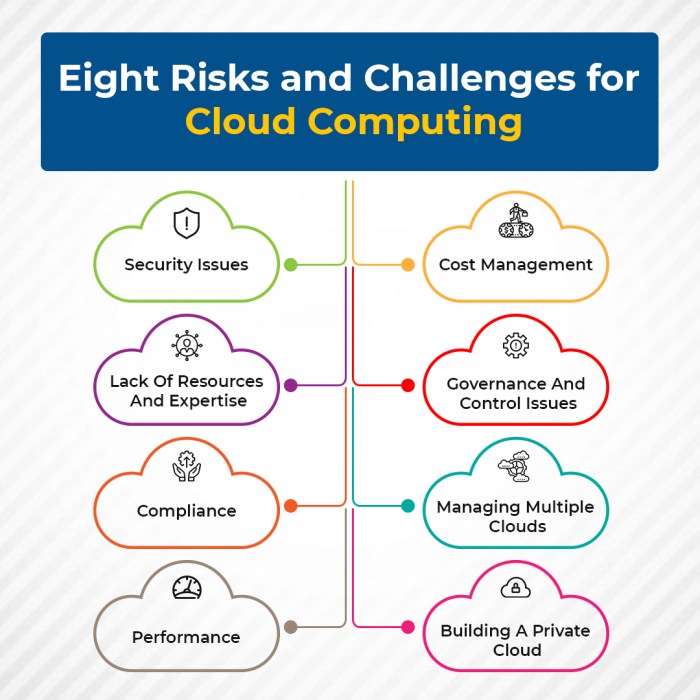
The rapid adoption of cloud computing has created a significant demand for skilled cloud professionals, leading to challenges in finding and retaining qualified individuals.
The demand for cloud engineers, architects, and administrators far exceeds the supply, resulting in a competitive job market and a skills gap.
Addressing the Skills Shortage
To address the skills shortage, several recommendations have been proposed:
- Training and Certification Programs:
Developing comprehensive training and certification programs can help individuals acquire the necessary skills and knowledge to work effectively in cloud environments.
- Upskilling Existing IT Staff:
Upskilling existing IT staff through training and reskilling programs can help organizations transition their workforce to cloud-based roles.
- Promoting Diversity in the Cloud Workforce:
Encouraging diversity in the cloud workforce can bring new perspectives and ideas, fostering innovation and addressing the skills gap.
Closing Summary
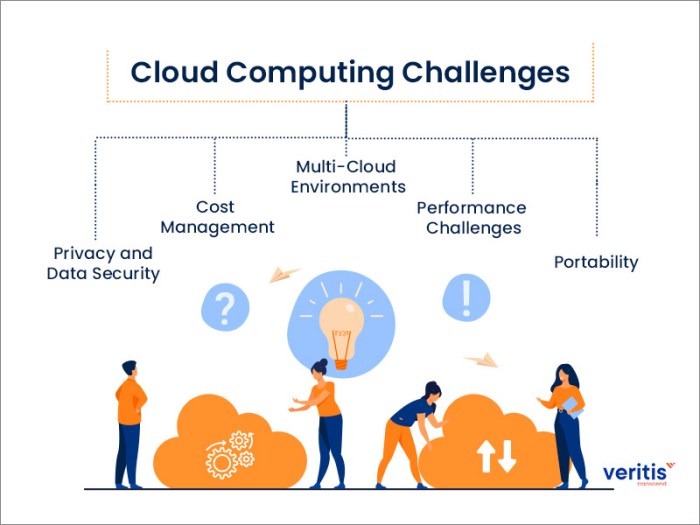
In conclusion, the challenges of cloud computing are multifaceted, encompassing data security, performance, cost management, scalability, integration, vendor lock-in, and skills shortage. However, these challenges are not insurmountable. By adopting a proactive approach, organizations can mitigate risks, optimize performance, and leverage the cloud’s transformative potential.
Embracing cloud computing requires a comprehensive understanding of its intricacies, a commitment to continuous improvement, and a willingness to adapt to evolving technologies and best practices.