Upfront Costs
Cloud computing entails initial investments associated with setup, infrastructure, and software licensing. These costs vary based on factors like the cloud service type, provider selection, and deployment scale.
Setup Fees
When adopting cloud computing services, organizations may encounter setup fees. These fees typically cover the initial setup and configuration of the cloud environment, including activities such as account creation, resource provisioning, and security configuration. The specific setup fees can vary depending on the cloud provider and the complexity of the cloud environment being established.




Infrastructure Costs
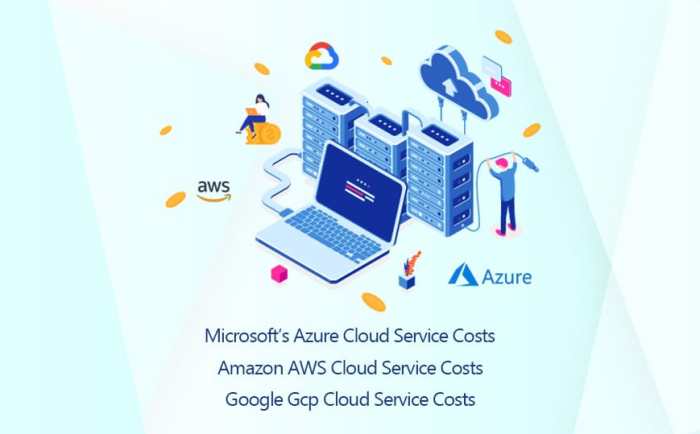
Infrastructure costs in cloud computing encompass expenses related to the underlying hardware, software, and network resources required to support cloud services. These costs can include:
- Compute Costs: Charges associated with the processing power and memory resources consumed by cloud-based applications and workloads. These costs are typically billed based on usage, such as per hour or per month, and can vary depending on the type of compute resources utilized (e.g., virtual machines, containers, or serverless functions).
- Storage Costs: Fees incurred for storing data in the cloud. Cloud providers offer various storage options with different pricing structures, such as block storage, object storage, and file storage. The cost of storage depends on factors like the amount of data stored, the storage tier selected, and the data access frequency.
- Networking Costs: Charges associated with data transfer between cloud resources, between cloud services, and between the cloud and on-premises environments. Networking costs can vary based on the volume of data transferred, the network bandwidth requirements, and the specific networking services used (e.g., virtual private clouds, load balancers, and firewalls).
Software Licensing Fees
Organizations using cloud services may also incur software licensing fees. These fees apply to proprietary software or applications provided by cloud providers or third-party vendors. The cost of software licensing can vary depending on the software type, the licensing model (e.g.,
subscription-based or perpetual), and the number of users or instances using the software.
Ongoing Costs
In addition to upfront costs, cloud computing also involves ongoing costs that businesses need to consider. These costs are typically based on usage and can vary depending on the specific services and resources consumed.
The ongoing costs of cloud computing can be categorized into three main types: usage fees, storage fees, and bandwidth fees.
Usage Fees
Usage fees are charges for the actual use of cloud computing resources. This can include charges for compute time, storage space, and network bandwidth. Usage fees are typically calculated on a per-hour or per-GB basis, and they can vary depending on the specific pricing model used by the cloud provider.
There are two main pricing models for usage fees: on-demand pricing and reserved pricing.
- On-demand pricing: With on-demand pricing, customers pay for the resources they use on an hourly basis. This is the most flexible pricing model, but it can also be the most expensive.
- Reserved pricing: With reserved pricing, customers commit to using a certain amount of resources for a specific period of time. This can result in significant savings compared to on-demand pricing, but it also requires a longer commitment.
Storage Fees
Storage fees are charges for storing data in the cloud. These fees are typically calculated on a per-GB-per-month basis. The cost of storage can vary depending on the type of storage used. For example, block storage is typically more expensive than object storage.
Bandwidth Fees
Bandwidth fees are charges for transferring data to and from the cloud. These fees are typically calculated on a per-GB basis. The cost of bandwidth can vary depending on the region where the data is being transferred.
Cost Optimization Strategies
Cloud computing costs can be optimized by implementing various strategies. These strategies involve selecting the right cloud service model, choosing appropriate instance types, and utilizing cost-saving measures such as autoscaling and spot instances. Monitoring and managing cloud usage are also essential for identifying and eliminating inefficiencies.
Selecting the Right Cloud Service Model
The cloud service model that best suits your needs can significantly impact your cloud computing costs. Infrastructure-as-a-Service (IaaS) offers more flexibility and control but also requires more management and expertise. Platform-as-a-Service (PaaS) and Software-as-a-Service (SaaS) offer simpler management and reduced costs, but they may limit customization and flexibility.
Choosing Appropriate Instance Types
Choosing the right instance type for your workload is crucial for optimizing cloud costs. Consider factors such as the number of CPUs, memory, storage, and network bandwidth required. Overprovisioning can lead to wasted resources and higher costs, while underprovisioning can result in performance issues.
Cloud providers often offer a range of instance types to cater to different needs and budgets.
Implementing Cost-Saving Measures
Cloud providers offer various cost-saving measures to help you optimize your cloud spending. Autoscaling allows you to automatically adjust your resource allocation based on demand, ensuring that you only pay for the resources you need. Spot instances, which are unused cloud resources sold at discounted prices, can also be leveraged to reduce costs.
Reserved instances offer discounts for committing to a certain amount of usage upfront.
Monitoring and Managing Cloud Usage
Regularly monitoring and managing your cloud usage is essential for identifying and eliminating inefficiencies. Cloud providers offer tools and dashboards to track resource utilization, costs, and performance metrics. Analyzing this data can help you identify areas where you can optimize your cloud usage and reduce costs.
Comparison with On-Premises IT
When evaluating the costs of cloud computing, it is essential to compare them with the costs of maintaining an on-premises IT infrastructure. This comparison involves various factors, including hardware acquisition and maintenance, software licensing, and IT staff salaries.
Cost Drivers in On-Premises IT
In an on-premises IT setup, organizations are responsible for procuring and maintaining all the hardware, software, and IT personnel necessary for their operations. These costs can be significant and include:
- Hardware Costs: Organizations must purchase servers, storage devices, networking equipment, and other hardware components to build and maintain their on-premises IT infrastructure.
- Software Licensing: Organizations need to acquire licenses for the operating systems, applications, and other software used in their on-premises IT environment.
- IT Staff Salaries: Organizations must hire and compensate IT professionals, such as system administrators, network engineers, and database administrators, to manage and maintain their on-premises IT infrastructure.
Cost Drivers in Cloud Computing
In contrast to on-premises IT, cloud computing offers a different cost structure. Organizations pay a subscription fee to access cloud services, which eliminates the need for upfront hardware and software investments. The primary cost drivers in cloud computing include:
- Subscription Fees: Organizations pay a monthly or annual fee to cloud service providers for the use of their infrastructure, platforms, or software.
- Usage-Based Charges: Some cloud services charge based on usage, such as the amount of storage consumed or the number of API calls made.
- Data Transfer Fees: Organizations may incur charges for transferring data into or out of the cloud, especially when using cloud services from different providers.
Key Factors Contributing to Cost Differences
The cost differences between cloud computing and on-premises IT can be attributed to several key factors:
- Scalability: Cloud computing offers scalability, allowing organizations to adjust their resource usage based on demand. This flexibility can lead to cost savings compared to on-premises IT, where organizations may overprovision resources to accommodate peak usage.
- Maintenance and Upgrades: Cloud service providers handle the maintenance and upgrades of their infrastructure and software, reducing the burden and costs associated with these tasks for organizations.
- Shared Resources: Cloud computing involves sharing resources among multiple organizations, leading to economies of scale and lower costs compared to on-premises IT, where resources are dedicated to a single organization.
Return on Investment (ROI)
Calculating the ROI of cloud computing investments involves measuring the financial benefits gained from cloud adoption against the initial and ongoing costs. It is crucial to consider both quantifiable and qualitative factors to accurately assess the ROI.
Cloud computing offers several benefits that can contribute to cost savings and increased revenue. These benefits include improved agility, scalability, and reliability, leading to increased productivity, enhanced customer satisfaction, and reduced IT expenses.
Calculating ROI
To calculate the ROI of cloud computing investments, organizations can follow these steps:
- Identify and quantify costs: Calculate the initial costs of cloud adoption, including migration expenses, training, and software licensing fees. Also, consider ongoing costs such as monthly subscription fees, data transfer charges, and storage costs.
- Identify and quantify benefits: Assess the quantifiable and qualitative benefits of cloud computing. Quantifiable benefits may include cost savings from reduced IT infrastructure, improved efficiency, and increased productivity. Qualitative benefits may include improved agility, scalability, and reliability.
- Calculate the net benefit: Subtract the total costs from the total benefits to determine the net benefit of cloud computing investments.
- Calculate ROI: Divide the net benefit by the total investment cost to obtain the ROI percentage. A positive ROI indicates that the investment in cloud computing is generating a financial return.
Factors Contributing to Positive ROI
- Cost Savings: Cloud computing can lead to significant cost savings in various areas, including IT infrastructure, maintenance, software licensing, and energy consumption.
- Increased Revenue: The agility and scalability of cloud computing enable businesses to respond quickly to market demands, launch new products and services faster, and improve customer satisfaction, leading to increased revenue.
- Improved Efficiency: Cloud computing streamlines IT operations, reduces manual tasks, and automates processes, resulting in improved efficiency and productivity.
- Reduced Risk: Cloud computing provides built-in security features, disaster recovery options, and regular updates, reducing the risk of data loss, downtime, and security breaches.
Market Trends and Future Costs
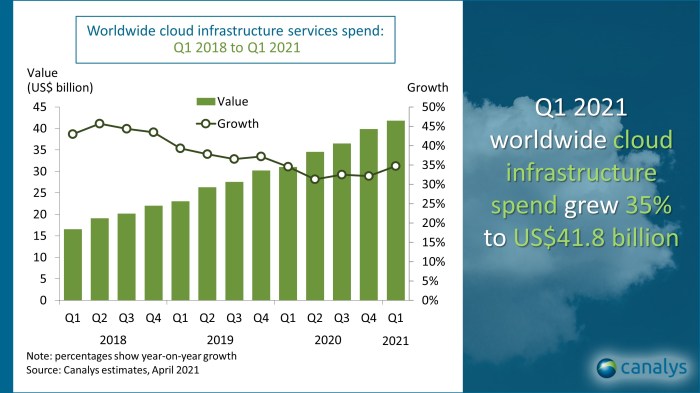
The cloud computing market is constantly evolving, driven by technological advancements, changing business needs, and evolving customer expectations. These trends are shaping the costs of cloud services and will continue to impact businesses in the years to come.
Changing Cloud Pricing Models
Cloud providers are moving away from traditional pricing models based on usage hours or resources consumed towards more flexible and consumption-based pricing models. This shift allows businesses to optimize their cloud spending and pay only for the resources they use.
Growing Popularity of Serverless Computing
Serverless computing is a cloud-based execution model where businesses no longer need to manage servers or infrastructure. This trend is gaining popularity as it reduces operational costs and allows businesses to focus on their core competencies.
Rise of Hybrid and Multi-Cloud Strategies
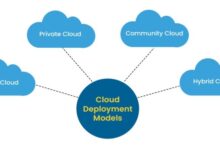
Many businesses are adopting hybrid and multi-cloud strategies, utilizing a combination of on-premises, private cloud, and public cloud services. This approach provides flexibility, cost optimization, and improved resilience.
Increased Focus on Security and Compliance
As cloud adoption grows, so does the need for robust security measures and compliance with regulations. Cloud providers are investing heavily in security features and certifications to meet the demands of businesses.
Emerging Technologies and Innovations
Advancements in artificial intelligence (AI), machine learning (ML), and edge computing are driving new cloud-based services and applications. These technologies can help businesses optimize their cloud usage, reduce costs, and improve efficiency.
Preparing for Future Costs
Businesses can prepare for future changes in cloud costs by:
- Adopting flexible cloud pricing models.
- Exploring serverless computing and other cost-effective cloud services.
- Implementing hybrid and multi-cloud strategies.
- Prioritizing security and compliance.
- Staying informed about emerging technologies and innovations.
By staying adaptable and embracing these trends, businesses can optimize their cloud spending and position themselves for success in the evolving cloud landscape.
Summary
In conclusion, the costs of cloud computing are a multifaceted tapestry, influenced by a multitude of factors ranging from upfront investments to ongoing usage fees. By carefully considering these costs and implementing effective optimization strategies, organizations can unlock the full potential of cloud computing while minimizing expenses.
Moreover, staying abreast of market trends and innovations will enable businesses to anticipate future cost changes and adapt their cloud strategies accordingly. Embracing cloud computing with a clear understanding of its costs empowers organizations to drive digital transformation, enhance agility, and achieve sustainable growth in the dynamic digital landscape.